While working on Void Builder, I encountered a pathfinding problem and if you have read my previous articles you know I have a thing for pathfinding. Here is the problem: there are monsters in the game that spawn randomly at a given range from the tiles placed. Those monsters must reach the center to attack the beacon. I need to get the "best" path to get there.
This looks easy, no? I have a starting position, a destination, discrete positions on a grid. This all we need to use most pathfinding algorithms and we could go for a simple A* pathfinding which Godot already implements.
But I would not write about it if I left it at that! You guessed it, using A*, does not fit my needs. With A*, monsters prioritize given directions. This means that if a monster is on the diagonal to its destinaton, it will first go vertically then horizontally for example. As a result, all monsters agglomerate on the four directions and that renders most other tiles useless.

This is usable but it does not work for Void builder. The aim of the game is to defend your beacon by placing tiles everywhere. If some paths are prioritized by monsters this completely changes the dynamic of the game and some parts of the map could entirely be defenseless as monsters would rarely walk over them.
Ideally, monsters should go to the center in a straight line.

Would you believe it! An algorithm made to solve this exact issue already exists. I present to you Bresenham's line algorithm!
Given two points, this algorithm returns a list of grid coordinates corresponding to all cells crossed by the resulting line. In short, this algorithm discretize a line relative to a grid coordinate system.
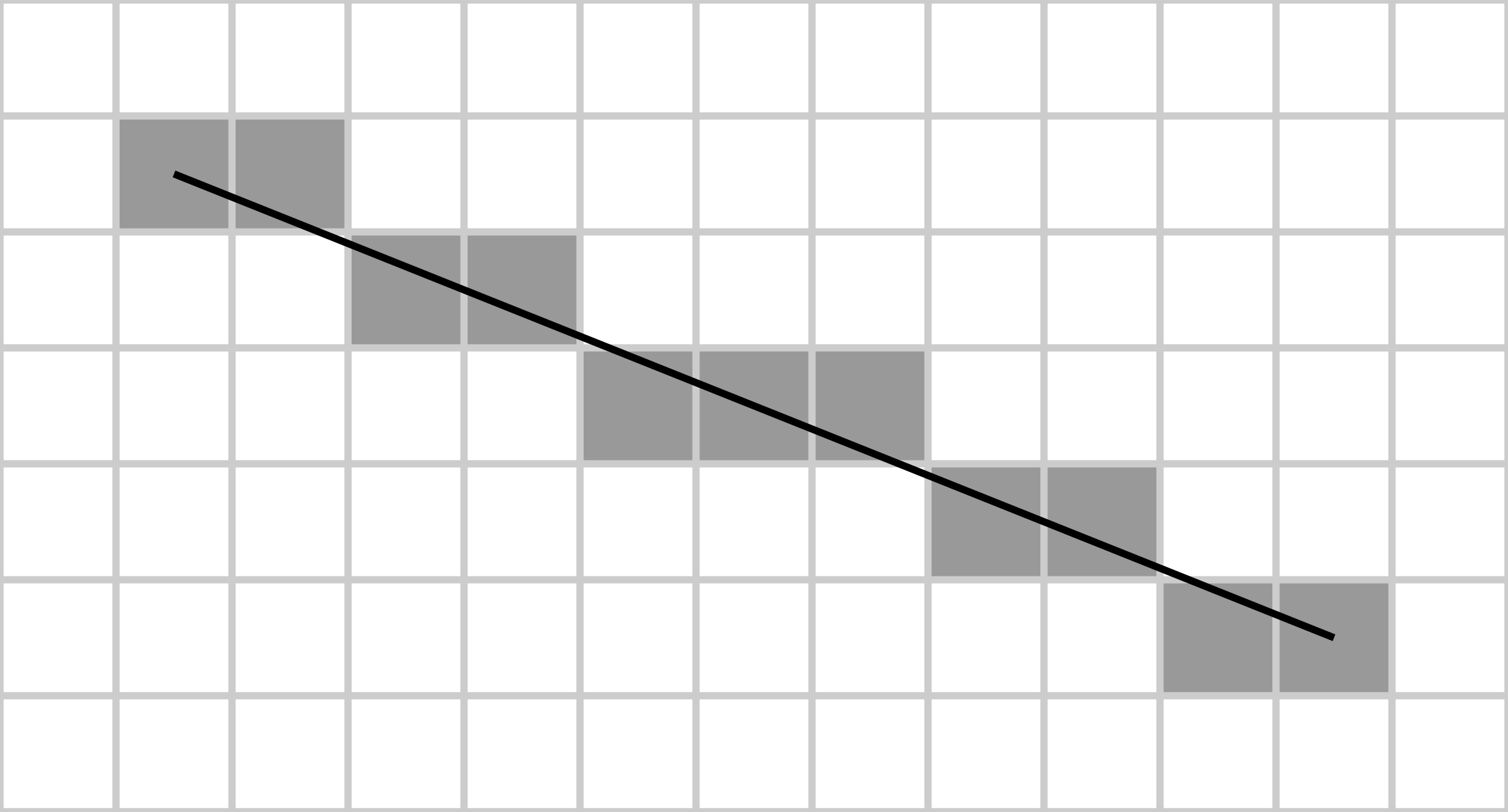
This will allow us to get a direct path from the monster positions to the center of the world that looks intuitive and that suits the game mechanics.
Here is my implementation of it in Godot, let's go over it step by step.
1# Bresenham line algorithm
2func get_line_cells(start: Vector2i, end: Vector2i) -> Array[Vector2i]:
3	var cells: Array[Vector2i] = [];
4	var x0 = start.x;
5	var y0 = start.y;
6	var x1 = end.x;
7	var y1 = end.y;
8
9	var dx = abs(x1 - x0);
10	var dy = -abs(y1 - y0);
11	var sx = 1 if x0 < x1 else -1;
12	var sy = 1 if y0 < y1 else -1;
13	var err = dx + dy;  # error term
14
15	while true:
16		cells.append(Vector2i(x0, y0));
17		if x0 == x1 and y0 == y1:
18			break;
19		var e2 = 2 * err;
20		if e2 >= dy:
21			err += dy;
22			x0 += sx;
23			continue;
24		if e2 <= dx:
25			err += dx;
26			y0 += sy;
27			continue;
28	return cells
As expected, the algorithm takes in two points to describe a line and outputs an array containing the coordinates of each crossed cells. In the first few lines, we simply store the components of the starting and ending points. We do this both for comfort and because we will use some components to increment the step at which we evaluate the line value.
1func get_line_cells(start: Vector2i, end: Vector2i) -> Array[Vector2i]:
2var cells: Array[Vector2i] = [];
3var x0 = start.x;
4var y0 = start.y;
5var x1 = end.x;
6var y1 = end.y;
Then we define some useful variables. The dx and dy variables are respectively the horizontal and vertical remaining distances to the ending point.
The sx and sy variables describe the steps with which we travel the line horizontally and vertically. If sx is positive we go from left to right and if sy is positive we go up. In this case, we increment by one in either directions but you could use more if working in world coordinates rather than grid coordinates.
Finaly, err describes the error term. It is the distance between the evaluated point and the actual value on the line.
💡 Warning: The vertical direction can vary according to the coordinate system of your game engine. Here we use the convention of a regular graph meaning y increases as we go up.
Note that dy is negative, we will get back to it later on.
1var dx = abs(x1 - x0);
2var dy = -abs(y1 - y0);
3var sx = 1 if x0 < x1 else -1;
4var sy = 1 if y0 < y1 else -1;
5var err = dx + dy;  # error term
Now we need to focus on the core of the algorithm. The loop starts is straightforward:
1cells.append(Vector2i(x0, y0));
2  if x0 == x1 and y0 == y1:
3    break;
4  var e2 = 2 * err;
5  ...
6return cells
Keep in mind that dy is negative. This means that dy < dx. The components dx and dy will be used as threshold to compare the error term to. So a low or negative error term means we stepped horizontally and increased the distance to the line vertically. Conversely, if the error term grows larger, it means we stepped vertically to get closer to the line and can start to step horizontally again.
As such we branch between two possibilities:
e2 >= dy - we are vertically close to the line) and we step horizontally (line 22 - x0 += sx) to continue towards the end point.e2 <= dx - we are vertically far from the line) and we take a vertical step (line 26 - y0 += sy) to correct the course of the discretization.And in each case, we increase the error term accordingly. If we stepped horizontally, we grew further from the line vertically and must increase the vertical error.
1if e2 >= dy:
2  err += dy;
3  x0 += sx;
4  continue;
5if e2 <= dx:
6  err += dx;
7  y0 += sy;
8  continue;
This algorithm is powerful because it only deals with integers and completely skips computing the line's slope. While this is most often an obsolete consideration this may prove relevant in situations where perfomance is critical.
Finaly, I will conclude by mentionning that my explanation is barely a comprehensive overview of one implementation of the algorithm and some parts are still hard to intuit for me. If you wish to go deeper into the subject, I suggest watching NoBS Code's video on the subject. They study another implementation of the algorithm but you will find similarities and understand the shortcuts that are necessary to reach such a streamlined algorithm.
Now this works perfectly. The monsters take organic paths. I ran some simulations and all tiles are equally interacted with (relative to their distance to the center obviously). But still the system could be enhanced.
Although some tiles that slow enemies already exist, I thought about adding some tiles that block the way entirely. Think of a mountain (an evolution from the rocks that already greatly slow enemies) that could not be walked over. Such a feature is not possible currently because we simply draw a line and send the monster on this path.
As such, a mixed solution will probably be most suited for my game: mainly using Bresenham's algorithm to save some performance and if an unwalkable tile ends up on a monster's path, recompute it using a pathfinding algorithm.
Hopefully you appreciate this kind of technical articles and I hope to see you in the next post. 🦦
 Sea Otter Games